


How to File ITR-2 Online for FY 2025-26 / AY 2026-27?
The ITR-2 is a form used by Indian citizens as well as non-resident Indians to file their tax returns with the Income Tax Department of India.
Table of Contents
- ITR-2 – Key Details at a Glance
- ITR 2 Form Eligibility
- Who is Not Eligible to File the ITR 2 Return?
- Perquisites Before Filing ITR-2
- What are the Components of the ITR-2 Form?
- Documents Required to file ITR 2
- How to File ITR 2 for FY 2024-25 (AY 2025-26)?
- Steps to file your ITR 2 using Offline Utility
- How to Verify Your ITR-2?
If you are planning to file for your income tax returns, you will be required to fill out the ITR-2 form and submit it. A partner at a Partnership Firm, HUFs, and individuals who are eligible for the ITR 1 form are not eligible for this form.
Filing Income Tax in India requires an assessee to fill up and submit different forms depending on the category the assessee falls under. The ITR-2 form is one type of form that is required to be filled in during the tax filing process.
ITR-2 – Key Details at a Glance
Category | Details |
Applicable To | Individuals, HUFs, NRIs, and Residents Not Ordinarily Resident (RNORs) not eligible for ITR-1 |
Not Applicable To | Taxpayers with income from business or profession |
Due Date for FY 2026-26 | 31 July 2026 |
Income Threshold (Schedule AL) | Assets and liabilities disclosure required if total income exceeds Rs.50 lakh |
ITR 2 Form Eligibility
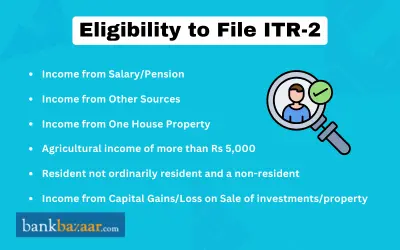
ITR-2 forms are used by individuals or Hindu Undivided Families whose total income for the assessment year includes:
- Salary or pension income from one or more employers.
- Income from house property including from more than one house property (self-occupied, let out, or deemed let out).
- Capital gains or capital losses from the sale or transfer of investments or property, both short-term capital gains (STCG) and long-term capital gains (LTCG).
- Income from other sources, including winnings from lottery, betting on racehorses, and other legal means of gambling.
- Agricultural income exceeding Rs.5,000 in a financial year.
- Foreign income or foreign assets including assets held outside India.
- Directors of a company or individuals who have invested in unlisted equity shares.
- Non-Resident Indians (NRIs) and Residents Not Ordinarily Resident (RNORs).
- Taxpayers whose total income from the above sources exceeds Rs.50 lakh.
If the Income Tax Returns are clubbed with a spouse, minor child etc, then their returns can only be filed together if the sources of income are similar to the ones mentioned above. Should there be a variation in earnings in even one category, the Assessee is liable to fill up a separate and relevant Income Tax Returns Form.
Who is Not Eligible to File the ITR 2 Return?
The following individuals are not eligible to file ITR-2:
- Any individual or HUF whose income is fully or partly earned from business or profession.
- Partners of a partnership firm who report income from such a firm (they must use ITR-3).
- Individuals claiming double taxation relief under Sections 90, 90A, or 91 of the Income Tax Act (they are required to use ITR-2 only if they have no business income; however, it is advisable to cross-check eligibility).
- Any person eligible to file ITR-1 who prefers a simpler form (though ITR-2 may still be filed if preferred)
Perquisites Before Filing ITR-2
Before you begin filing your ITR-2, you must ensure the following requirements are met:
- You are a registered user on the Income Tax e-Filing portal with a valid User ID (PAN) and password.
- Your PAN is active and linked with your Aadhaar. If your PAN is not linked with Aadhaar, it becomes inoperative, which may restrict your access on the portal.
- At least one bank account is pre-validated on the e-Filing portal and nominated for refund credit.
- A valid mobile number linked to your Aadhaar, e-Filing account, or bank account is available for e-Verification of your return.
- All relevant documents and statements (Form 16, Form 26AS, capital gains statements, etc.) are ready.
What are the Components of the ITR-2 Form?
The ITR-2 Form is divided into the following categories:
Part A: General Information
Part B-TI: Computation of Total Income
Part B-TTI: Computation of tax liability on total income
Schedules
Schedule | Details |
Schedule S | Details of income from salary |
Schedule HP | Details of income from house property |
Schedule CG | Computation of income from capital gains |
Schedule 112A | Income from sale of equity share of a company |
Schedule 115AD | Income from sale of equity share of a company (for non-residents) |
Schedule OS | Computation of income from other sources |
Schedule CYLA | Details of Income after Set off of current year losses |
Schedule BFLA | Details of Income after Set off of Brought Forward Losses of earlier years |
Schedule CFL | Details of Losses to be carried forward to future years |
Schedule VIA | Deductions under Chapter VI-A (Section) |
Schedule 80G | Details of donations entitled for deduction under section 80G |
Schedule 80GGA | Donations for rural development and scientific research |
Schedule AMT | Computation of Alternate Minimum Tax payable under Section 115JC |
Schedule AMTC | Tax computation under Section 115JD |
Schedule SPI | Income of specified persons (spouse, minor child etc) includible in income of the assessee (income of the minor child, in excess of Rs. 1,500 per child, to be included) |
Schedule SI | Income chargeable to tax at special rates |
Schedule EI | Details of Exempt Income (Income not to be included in Total Income) |
Schedule PTI | Income from business trust or investment fund |
Schedule IT | Statement of payment of advance-tax and tax on self-assessment |
Schedule TDS1 | Details of tax deducted at source on salary |
Schedule TDS2 | Statement of tax deducted at source on income other than salary |
Schedule FSI | Details of Income from outside India and tax relief |
Schedule TR | Summary of tax relief claimed for taxes paid outside India |
Schedule FA | Details of Foreign Assets and Income from any source outside India |
Schedule 5A | Information regarding apportionment of income between spouses governed by Portuguese Civil Code |
Schedule AL | Liability and assets at year end |
Instructions to Fill out The ITR 2 Form
When filling up the ITR-2 Form it is advisable to make note of the following instructions and guidelines:
- Fill out the form as per the following sequence:
- Part A
- All the schedules
- Part B-TI and Part B-TTI
- Verification
- Any schedules not applicable to the Assessee should be struck out with NA (Not applicable) mentioned
- The Assessee should mention NA against any item not applicable to him or her
- All figures are to be rounded off to the nearest one rupee except figures for total income/loss and tax payable, which are to be rounded off to the nearest multiple of ten.
- Individuals falling under the Employer Category you should choose 'Government' if he or she is a Central/State Government employee
- Individuals working in a public sector company of the Central/State Government should choose 'PSU'
- If the Assessee is claiming double taxation relief under section 90/90A/91, the ITR-2 Form cannot be used
- ITR-2 is an annexure-less form. No documents are required to be attached to the form during submission
Documents Required to file ITR 2
For Salaried Employees
- Form 16 issued by your employer (Part A and Part B)
- Form 16A: For TDS deducted on interest income from fixed deposits or savings accounts
- Form 26AS and Annual Information Statement (AIS): For verification of all TDS deducted on salary and non-salary income
- Rent receipts for claiming House Rent Allowance (HRA), if not already submitted to the employer
For Capital Gains and Investments
- Capital gains statement from your broker or depository participant (for shares, mutual funds, etc.)
- Sale deed or property valuation report (for sale of immovable property)
- Bank passbook or Fixed Deposit Receipts (FDRs) to calculate interest income
For Deductions and Tax Savings
- Life and health insurance premium receipts (for Sections 80C and 80D)
- Donation receipts with ARN (for Section 80G)
- Receipts for tuition fees, PPF contributions, ELSS investments, home loan repayment details (for Section 80C)
- Medical bill receipts or disability certificate for Section 80DD or 80DDB claims
General Documents
- Copy of the previous year's income tax return (ITR-V)
- Bank statements for the relevant financial year
- Savings certificates or other investment proofs
How to File ITR 2 for FY 2024-25 (AY 2025-26)?
You can file your income tax return either offline or online. However, only taxpayers who are 80 years of age or older are eligible for ITR 2 offline filing.
Such individuals may quickly file returns using a hardcopy of ITR-2 form and a bar-coded return of income earned. Furthermore, when an assessee files this paper form, the IT department issues an acknowledgement.
To file your ITR online, follow the steps mentioned below:
- Visit the Income Tax e-Filing portal and log in using your PAN as your User ID and your password.
- On your dashboard, click ‘e-File’.
- Select ‘Income Tax Returns’.
- Choose ‘File Income Tax Return’.
- Select ‘Assessment Year 2026–27’ and click ‘Continue’.
- Select ‘Online’ as the Mode of Filing and click ‘Continue’.
- Select your Status (Individual or HUF) and click ‘Continue’.
- Choose the ITR form:
- If unsure, select ‘Help me decide which ITR Form to file’ and follow the guided questions.
- If you know your form, select ‘I know which ITR Form I need to file’, choose ITR-2 from the dropdown, and click Proceed with ITR.
- Review the list of documents needed and click ‘Let's Get Started’.
- Go to Part A – General Information, verify the pre-filled personal data, and update contact details, filing status, bank details, and residential status if required. Select whether you are opting for the New Tax Regime (Section 115BAC) or the Old Tax Regime.
- Fill in all applicable schedules such as the Salary, House Property, Capital Gains (including Schedule VDA for virtual digital assets), Other Sources, deductions under Schedule VIA, etc. Click Confirm at the end of each section.
- After completing all sections, click ‘Proceed’.
- If there is a tax liability: You will see a summary of your tax computation. You can choose ‘Pay Now’ or ‘Pay Later’. Paying later carries the risk of being treated as a defaulter and attracting interest under Section 234B or 234C.
- If there is no tax liability or a refund is due: Click Preview Return to proceed directly to submission.
- After payment (if applicable), click ‘Return to Filing’ and then ‘Preview Return’.
- On the Preview and Submit Your Return page, enter the Place, select the declaration checkbox, and click ‘Proceed to Preview’.
- Preview your return carefully and click ‘Proceed to Validation’.
- Once validated (and any errors corrected), click on ‘Proceed to Verification’.
- On the Complete Your Verification page, select your preferred verification method and click ‘Continue’.
- Choose an e-Verification option and follow the on-screen instructions to complete the process. Once e-Verified, you will receive a confirmation on your registered mobile number and email address, along with a Transaction ID and Acknowledgement Number.
Steps to file your ITR 2 using Offline Utility
The process to file ITR-2 using the Offline Utility is mentioned below:
- Log in to the Income Tax e-Filing portal and navigate to ‘e-File’.
- Select ‘Income Tax Returns’.
- Choose ‘File Income Tax Return’.
- Then click ‘Downloads’ in the top bar.
- Select the ‘Assessment Year 2026-27' from the dropdown and download the offline utility (available as a Windows or Mac application).
- Install and open the utility. ‘Select ITR-2' from the list of forms.
- Import your pre-filled data by logging in with your PAN and OTP, or manually enter all required details across all applicable schedules.
- Validate each section and resolve any errors highlighted by the utility.
- Once all sections are validated, compute the tax and review the tax summary.
- Generate and save the return file in JSON format.
- Log in to the e-Filing portal and upload the JSON file by navigating to ‘e-File’.
- Choose ‘Income Tax Returns’.
- Select ‘File Income Tax Return’
- Choose ‘Offline mode’
- Click on ‘Upload’.
- After upload, verify your return using any of the available e-Verification methods.
How to Verify Your ITR-2?
The different e-Verification methods are mentioned below:
- Aadhaar OTP: OTP sent to Aadhaar-registered mobile number (instant).
- Net Banking: Login through your bank's net banking portal and e-Verify.
- Bank Account EVC: Electronic Verification Code sent to your pre-validated bank account.
- Demat Account EVC: EVC generated through your CDSL or NSDL demat account.
- ITR-V via Post: Send a signed physical copy of ITR-V to CPC Bengaluru 560500 by normal or speed post within 30 days.
FAQs on ITR 2 Form
1.Who can file an ITR 2 form?
Anyone who's income falls under the head capital gains are eligible to file for ITR 2 form.
2.Can a non-resident India file the ITR 2 form?
Yes, a non-resident Indian is eligible to file for ITR 2 form.
3.What are the documents that one requires to file an ITR 2 form?
Documents like TDS certificates, bank statements, last year's tax return copy, savings certificates, etc. are required to file an ITR 2 form.
4.Is it possible to file ITR 2 online?
Yes, you may file your ITR-2 online. Taxpayers above the age of 80 years can file ITR-2 offline.
5.Which ITR should I submit if my primary source of income is the selling of shares or mutual funds?
If your only source of income is the selling of mutual funds, securities, or shares, you need to submit ITR 2.
6.Where can I get the ITR 2 form?
You can obtain an ITR 2 form by visiting the official website of income tax e-filing.
7.Can a Hindu Undivided Family or Firm rebate under Section 87A?
No, since the rebate under Section 87A is solely accessible to individuals, anybody other than an individual cannot claim it.
8.What types of income are taxed under the head Capital Gains?
Under the head Capital Gains, profit/gains originating from the transfer of a capital asset during the year will be taxed.
9.What is the ITR 2 Form's structure?
Part A and Part B make up the two components of the ITR 2 Form. Part A covers basic information, whereas Part B includes the computation of total income and the tax due on the entire earnings.

Kankana Mukherjee is an engineer and has over 4.5 of experience in content writing. Combining the expertise in financial content writing achieved in her 2 years association with BankBazaar, and a knack for clear and engaging content, Kankana simplifies complex financial concepts and offers practical insights to help readers make informed decisions and achieve financial success.

Disclaimer
Credit Card:
Credit Score:
Personal Loan:
Home Loan:
Fixed Deposit:


Copyright © 2026 BankBazaar.com.