


How to File ITR-1 Sahaj Form Online for Salaried Employees
ITR1 Form is also known as Sahaj Form which is particularly designed for salaried employees to file income tax returns. It is used by many salaried employees to file their tax returns.
To be able to file income tax returns using ITR form 1, one needs to have a regular flow of income (either salary or pension) or rented income.
What is Form ITR-1 Sahaj?
ITR-1, also known as Sahaj, is an income tax form for pensioners or resident individual salaried taxpayers that earn a straightforward income. Some of the main uses of ITR-1 are when the total income is up to Rs.50 lakh, LTCG u/s 112A is up to Rs.1.25 lakh, interest income, two house property, and pension or salary.
Eligibility Criteria for ITR-1 Sahaj
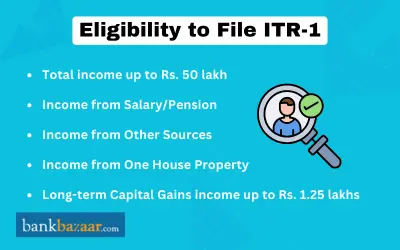
Who Can File ITR-1?
You can file ITR-1 Sahaj if you are a Resident Individual and your total income for the financial year does not exceed Rs.50 lakh. Your income sources should include:
- Salary or Pension
- Agricultural Income up to Rs.5,000
- LTCG u/s 112A is up to Rs.1.25 lakh (no carried-forward capital loss)
- Income of minor child or spouse are clubbed (must fall under the permintted heads)
- Income from FD interest or savings interest.
- Income that is generated from two house property
Who Cannot File ITR-1?
You cannot file ITR-1 Sahaj if:
- Your total income exceeds Rs.50 lakh.
- You have more than one house property.
- You have income from lottery, racehorses, or other gambling activities.
- You have taxable capital gains.
- You have income from business or profession.
- You are a director in a company.
- You have investments in unlisted equity shares.
- You are a Resident Not Ordinarily Resident (RNOR) or a Non-Resident Indian (NRI).
- You have agricultural income exceeding Rs.5,000.
How to File ITR-1 (SAHAJ) Online on Income Tax Portal?
The process to file ITR-1 on the Income Tax Portal is mentioned below:
- Log in using your PAN as your user ID along with your password.
- On your Dashboard, select ‘e-File’
- Choose ‘Income Tax Returns’.
- Select ‘File Income Tax Return’.
- Select ‘Assessment Year 2026-27' and the mode of filing as ‘Online’. Click ‘Continue’.
- If you have already begun filling in the return and saved it, click ‘Resume Filing’. To start afresh, click ‘Start New Filing’.
- Select your applicable status as ‘Individual’ and click on ‘Continue’.
- Select ‘ITR-1’ as your applicable form and click ‘Proceed’. If you are unsure which form to use, you may click ‘Help me decide which ITR Form to file’ on the portal.
- Review the list of documents required and click ‘Let's Get Started’.
- Select the appropriate reason(s) for filing your return (e.g., income exceeds the basic exemption limit, you wish to claim a refund, etc.) and click ‘Continue’.
- For AY 2026-27, the New Tax Regime is the default. The system will auto-select ‘No’ for opting out. If you wish to file under the ‘Old Tax Regime’, select ‘Yes’ in the Personal Information section to explicitly opt out of the New Tax Regime.
- Review and edit the pre-filled information in each section and click ‘Confirm’ at the end of each:
- Section 1 - Personal Information: Verify your name, PAN, Aadhaar, address, contact details, nature of employment, bank account, and tax regime selection.
- Section 2 – Gross Total Income: Review income from salary/pension (refer to Form 16), house property (up to two properties, including interest on borrowed capital details), LTCG under Section 112A, and other sources (interest income, family pension, etc.). Add exempt income if applicable.
- Section 3 – Total Deductions: Add or confirm deductions under Chapter VI-A (Sections 80C, 80CCC, 80CCD, 80D, 80DD, 80E, 80GG, 80TTA, etc.). Note that additional information is now mandatory for several deduction sections.
- Section 4 – Tax Paid: Confirm TDS from salary and other sources, TCS, advance tax, and self-assessment tax. Cross-reference with your Form 26AS and AIS.
- Section 5 – Total Tax Liability: Review the computed tax liability or refund based on the information provided. You can also view a summary of your tax computation here.
- If there is any remaining tax payable after accounting for TDS, TCS, and advance tax:
- Click ‘Pay Now’. You will be redirected to the e-Pay Tax service.
- Clicking ‘Pay Later’ is possible but carries a risk of being considered in default and may attract interest.
- Once all sections are completed and confirmed, click ‘Proceed’. If there is no tax liability or you are eligible for a refund, click ‘Preview Return’. Select the declaration checkbox and click ‘Proceed to Validation’.
- The system will run an internal validation. If errors are flagged, go back and correct them before proceeding. Once validation is successful, click ‘Preview' to review your return.
- Once the return is validated, click ‘Proceed to Verification’.
- On the ‘Complete Your Verification’ page, select your preferred method of e-Verification:
- Aadhaar OTP (recommended as it is quick, paperless, and secure)
- Net Banking
- Electronic Verification Code (EVC) via your pre-validated bank account or Demat account
- Sending a signed physical copy of ITR-V to the Centralized Processing Centre (CPC), Bengaluru 560500 (by speed post only)
- Once your return is successfully e-verified, a success message will appear along with your ‘Transaction ID’ and ‘Acknowledgement Number’. A confirmation will also be sent to your registered mobile number and email ID.
Know more about Income Tax Slab, Income Tax Refund Status,Income Tax Refund and Income Tax Login
Documents Required to File ITR-1 for FY 2025-26
The list of documents that must be provided to file ITR-1 for FY 2025-26 are mentioned below:
- Form 16: Issued by your employer; contains salary details and TDS deducted at source.
- Form 26AS: Annual Information Statement (AIS) showing TDS, TCS, and taxes paid.
- Annual Information Statement (AIS) and Taxpayer Information Summary (TIS): Download from the Income Tax e-Filing portal to cross-check all income and tax details.
- PAN Card.
- Aadhaar Card (linked to PAN – mandatory).
- Bank account details: Account number, IFSC code, and bank name for any potential refund.
- Interest certificates: From banks, post offices, or cooperative societies for interest income.
- Salary slips.
- Proof of deductions: Investment receipts for Section 80C (PPF, ELSS, LIC), Section 80D (health insurance policy), HRA receipts, home loan interest certificate, etc.
ITR-1 Form Structure
The structure of ITR-1 is mentioned below:
- Part A: General information.
- Part B: Gross total income.
- Part C: Total income that is taxable and deductions.
- Part D: The tax payable computation.
- Part E: Bank details.
- Schedule IT.
- Schedule – TDS.
- Verification.
ITR-1 Form Changes from AY 2025-2026
Given below are some key changes to ITR-1 form from AY 2026-2027:
- Up to Two House Properties Now Allowed: Previously, ITR-1 could only be used if you had income from one house property. From AY 2026-27 onwards, taxpayers with income from up to two house properties can now file ITR-1, provided there are no brought-forward losses from prior years.
- LTCG under Section 112A Now Reportable in ITR-1: Taxpayers who have long-term capital gains from listed equity shares or equity-oriented mutual funds under Section 112A, up to Rs. 1.25 lakh, can now report these gains in ITR-1, provided they have no brought-forward or carry-forward capital losses. Previously, any capital gains required filing ITR-2.
- Aadhaar Enrolment ID No Longer Accepted: The 28-digit Aadhaar Enrolment ID can no longer be entered. Only a valid 12-digit Aadhaar number is accepted. Ensure your Aadhaar and PAN are linked before filing.
- Deductions and Disclosures are Enhanced:
- In the e-filing portal, you must select deductions under Section 80C to 80U from the drop-down menu. You must also specify the exact sub-section/clause. This improves transparency and accuracy.
- New fields have been added for income from retired accounts that have been maintained abroad for better tracking.
- Additional Column under Schedule TDS: Under Schedule TDS - Details, a column has been added to provide the section under which TDS has been deducted.
Conclusion
Filing your ITR-1 Sahaj form online is a straightforward process if you follow the steps mentioned above. Ensure you have all the necessary documents, fill in the correct details, and e-verify your return. By doing so, you can comply with your tax obligations smoothly and efficiently.
FAQs on ITR1 Form
1.What is the due date for filing ITR-1 for FY 2025-26?
The due date for filing ITR-1 for FY 2025-26 is 31 July 2026. It's important to file your return before this date to avoid penalties and interest on any tax dues.
2.Can I file ITR-1 if I have a house property with a co-owner?
Yes, you can file ITR-1 if you are a joint owner of a single house property. However, if you have income from more than one house property, you cannot use ITR-1.
3.What happens if I make a mistake in my ITR-1 form?
If you discover a mistake in your ITR-1 form after submission, you can file a Revised Return. This must be done within three months before the end of the relevant Assessment Year.
4.Do I need to attach any documents while filing ITR-1?
No, ITR-1 is an annexure-less form. You do not need to attach any documents while filing. However, keep all relevant documents handy in case the tax authorities request them.
5.How can I e-verify my ITR?
You can e-verify your ITR using Aadhaar OTP, Net Banking, Electronic Verification Code (EVC) through your bank account or Demat account, or by sending a signed physical copy of ITR-V to CPC Bengaluru.
6.Can I file ITR-1 if I have income from freelance work?
No, if you have income from business or profession, including freelance work, you cannot file ITR-1. You need to use a different ITR form suitable for business income.
7. Is it mandatory to provide my bank account details in ITR-1?
Yes, it is mandatory to provide your bank account details in ITR-1. This is where any tax refunds will be credited.
8.What should I do if I haven't linked my Aadhaar with PAN?
Linking Aadhaar with PAN is mandatory. If you haven't done so, link them before filing your ITR. You can do this on the Income Tax e-Filing portal.
9.How can I check the status of my filed ITR?
You can check the status of your filed ITR by logging into the Income Tax e-Filing portal and navigating to "View Returns/Forms". Here, you can see the status of your submitted returns.
10.Can I claim deductions under Section 80C in ITR-1?
Yes, you can claim deductions under Section 80C in ITR-1 if you’ve opted for old tax regime. Ensure you have the necessary investment proofs to support your claim.
11.How to file ITR-1 with exempt agricultural income?
Yes, you can file ITR-1 with exempt agricultural income.
12.Can I include dividend income from mutual funds?
Yes, investors are now taxed on dividend income from mutual funds. It must be recorded under ‘Other Income’.
13.Can I file ITR-1 if I earn Rental Income?
Yes, you can file ITR-1 if you have your own property.
14.Can I file ITR-1 for free?
Yes, you can file ITR-1 for free.
15.Are there restrictions on the number of returns I can file through one email ID and mobile number?
Yes, you can file ten returns through the same mobile number as well as email ID.

Kankana Mukherjee is an engineer and has over 4.5 of experience in content writing. Combining the expertise in financial content writing achieved in her 2 years association with BankBazaar, and a knack for clear and engaging content, Kankana simplifies complex financial concepts and offers practical insights to help readers make informed decisions and achieve financial success.

Disclaimer
Credit Card:
Credit Score:
Personal Loan:
Home Loan:
Fixed Deposit:


Copyright © 2026 BankBazaar.com.