


ITR-4 Form for FY 2025-26 / AY 2026-27
ITR-4, also known as the Sugam form, is the income tax return form for resident individuals, Hindu Undivided Families (HUFs), and partnership firms (excluding Limited Liability Partnerships) that earn income from a business or profession and choose to declare that income under the presumptive taxation scheme as set out in Sections 44AD, 44ADA, or 44AE of the Income Tax Act, 1961.
What is ITR-4 (Sugam)?
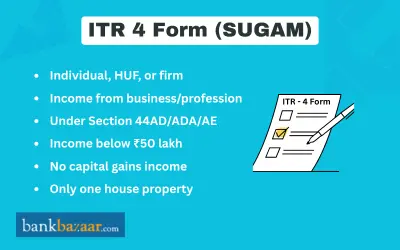
ITR-4 is the return form for taxpayers who earn an income from business or profession and are choosing to file under the presumptive tax scheme as prescribed by Sections 44AD, 44ADA, or 44AE of the Income-tax Act, 1961. Taxpayers with business income can use this form even if they have an income from salary/pension or own even one house property.
Taxpayers who do wish to file under the presumptive scheme, they need to file ITR-3.
Professionals who are freelancers such as bloggers, Instagram Influencers, YouTubers, consultants, or any professionals like doctor, lawyer, engineer or CA who report their income on presumptive basis are required to file ITR-4, depending on the eligibility criteria.
Presumptive Taxation Scheme
Presumptive taxation allows small taxpayers, e.g. traders, professionals, transporters and others, to declare income at a specified percentage of their turnover, or receipts, typically no books of accounts are need to be maintained. The scheme was designed to ease compliance and simplify the tax return process for small taxpayers who may lack the necessary environment to keep sophisticated financial records.
Key Features of the Presumptive Taxation Scheme are:
- No books of accounts need to be maintained.
- Income is assumed at a prescribed percentage of turnover or gross receipts.
- No separate deductions for individual business expenses are permitted.
- Deductions under Chapter VI-A (e.g. Sections 80C to 80U) may still be claimed.
- 100% of advance tax must be paid in a single instalment on or before 15 March of the relevant financial year.
- A lower presumptive rate of 6% (instead of 8%) applies when receipts are collected digitally, encouraging cashless transactions.
Sections under Presumptive Taxation Scheme
The different sections under presumptive taxation scheme are discussed below:
Criteria | Section 44AD | Section 44AE | Section 44ADA |
Who Can Use | Small business owners (e.g., traders, retailers, construction contractors) | Transporters owning goods carriages | Professionals (e.g., doctors, lawyers, architects, engineers) |
Maximum Turnover/Receipts | Up to Rs.2 crore (Rs.3 crore if >95% digital receipts) | Not more than 10 goods vehicles owned during the year | Up to Rs.50 lakh (Rs.75 lakh if >95% digital receipts) |
Presumptive Income Calculation | 8% of turnover (6% for digital payments) | Rs.7,500 per vehicle/month | 50% of gross receipts |
Books of Accounts | Not required | Not required | Not required |
Deductions Allowed | No further deductions allowed | No further deductions allowed | No further deductions (except partnership firms can claim interest/remuneration to partners) |
Advance Tax | 100% by 15 March | 100% by 15 March | 100% by 15 March |
Professions Covered Under Section 44ADA
The below-mentioned professions fall under Section 44ADA:
- Legal (lawyers, advocates)
- Medical (doctors, surgeons)
- Engineering or Architectural
- Accountancy (chartered accountants, cost accountants)
- Technical Consultancy
- Interior Decoration
- Any other profession notified by the Central Board of Direct Taxes (CBDT)
Who is Not Eligible for the Presumptive Taxation Scheme under Section 44AD?
The purpose of Section 44AD is to provide relief to small taxpayers operating any type of business, with the exception of the following:
- Businesses that ply, hire, or lease goods carriages (these fall under Section 44AE).
- Persons earning income in the form of commission or brokerage (e.g. insurance agents).
- Persons carrying on any agency business.
- Any business whose total gross receipts exceed Rs.2 crore (or Rs.3 crore under the digital receipts threshold).
- Persons required to maintain books of accounts under Section 44AA(1) (i.e. those carrying on a specified profession under that section).
Who can/cannot file ITR-4?
Who Can File ITR-4
ITR-4 Form must be submitted by people whose income is derived from the sources listed below:
- Total income does not exceedRs.50 lakh during the financial year.
- Has business income computed under Section 44AD or Section 44AE.
- Has professional income computed under Section 44ADA.
- Has income from salary or pension of up toRs.50 lakh.
- Has income from up to two house properties (not co-owned), with income not exceedingRs.50 lakh — this was expanded from one property starting AY 2026-27.
- Has Long-Term Capital Gains (LTCG) under Section 112A (on listed equity shares or equity mutual funds) not exceedingRs.1.25 lakh, with no losses brought forward or carried forward under the capital gains head.
- Has income from other sources up toRs.50 lakh (excluding lottery winnings and income from horse racing).
- Has agricultural income up toRs.5,000.
Who is Not Eligible to File ITR-4
- Residents but Not Ordinarily Resident (RNOR), and Non-Resident Indians.
- Total income exceedsRs.50 lakh.
- Is a director in a company.
- Holds unlisted equity shares at any point during the previous year.
- Has assets (including financial interests in any entity) outside India, or is a signing authority on any account held outside India.
- Has income from more than two house properties, or co-owns a house property.
- Has taxable capital gains (short-term or long-term), other than LTCG under Section 112A up toRs.1.25 lakh with no carry-forward or brought-forward losses.
- Has income from lotteries, horse racing, legal gambling, or income taxable at special rates under Section 115BBDA or Section 115BBE.
- Has income from Virtual Digital Assets (VDAs) / cryptocurrency.
- Has agricultural income exceedingRs.5,000.
- Has income from sources outside India.
- Claims relief under Section 90, 90A, or 91 (foreign tax relief / double taxation avoidance).
- Has a tax credit claim for TDS in the name of another person.
- Claims deductions under Section 57 (other than a deduction for family pension).
- Has income for which TDS has been deducted under Section 194N (cash withdrawals above the threshold).
- Has deferred income tax on Employee Stock Options (ESOPs) received from an eligible start-up under Section 80-IAC.
- Has income from a business or profession that falls outside the scope of Sections 44AD, 44ADA, or 44AE (e.g. commission, brokerage, speculative business income).
- Has losses brought forward or losses arising under any head of income.
Documents Required to File ITR-4 in FY 2025-26 (AY 2026-27)
Identity and Income Documents
- PAN Card
- Aadhaar card (12-digit Aadhaar number; the 28-digit enrolment ID is no longer accepted)
- Form 16 (certificate of TDS on salary issued by your employer)
- Form 16A (certificate of TDS on income other than salary)
- Form 26AS and Annual Information Statement (AIS) from the income tax e-filing portal
- Bank statements for all accounts held during the financial year
Business or Professional Home
- Records of total gross receipts or turnover for the year
- GSTIN (if registered under GST) and GST return details for optional cross-reporting
- Details of cash in hand, stock-in-trade, sundry debtors, sundry creditors, and fixed assets
Deduction or Professional Home
- Investment premium payment receipts (LIC, ULIP, PPF, ELSS, etc.) for Section 80C
- Health insurance premium receipts and policy number for Section 80D
- Housing loan interest certificate and loan account details for Sections 80E, 80EE, 80EEA
- Donation receipts with the donee's PAN for Section 80G
- Rent receipts and rental agreement for Section 80GG (and mandatory Form 10BA before filing)
- PRAN (Permanent Retirement Account Number) for NPS deductions under Sections 80CCD(1) and 80CCD(1B)
- Form 10IA acknowledgement if claiming deductions under Sections 80DD or 80U
Other Documents
- Advance tax payment challans (BSR code, date of payment, challan number)
- Self-assessment tax payment challans
- Form 10-IEA acknowledgement number and filing date (if opting out of the new tax regime)
How to File ITR-4 for FY 2025-26 (AY 2026-27)?
Registered users have access to the pre-filling and filing of ITR-4 services on the e-Filing portal. Individual taxpayers, HUFs, and firms (not including LLPs) can use this service to submit their ITR-4 tax returns online through the e-Filing portal. Before submitting the form online, you must complete all six sections of the ITR-4. There is a preview page where you can check the accuracy of the information you have entered. These are the sections:
- Personal Information
- Gross Total Income
- Disclosures and Exempt Income
- Total Deductions
- Taxes Paid
- Total Tax Liability
Step 1: Personal Information - You must double-check the information that is automatically filled in from your e-Filing profile in the ITR's Personal Information section. Some of your personal information cannot be changed directly in the form. You can, however, visit your e-Filing profile to make the necessary modifications.
In your e-Filing profile, you can edit your contact information, filing type information, partner information (if applicable), bank information, and authorised representative.
Step 2: Gross Total Income - To verify the details of your income sources, such as your real estate holdings, business or profession, pension or pay, and other sources, you must go over the pre-filled information in the Gross Total Income section.
Step 3: Disclosures and Exempt Income - You must include information about your company's financial details, gross receipts reported for GST (optional), and exempt income in the Disclosures and Exempt Income section.
Step 4: Total Deductions - You must add and confirm any deductions that you wish to claim under Chapter VI-A of the Income Tax Act in the section labelled ‘Total Deductions.’
Step 5: Taxes Paid - You must confirm the taxes you paid in the previous year in this section. Included in the tax information are TDS from Salary and Other Income as reported by the Payer, Advance Tax, Self-Assessment Tax, and TCS.
Step 6: Total Tax Liability - You can view your income computation, tax computation, total tax, interest, and cess. You must verify your tax liability information according to the fields you had earlier filled out in the computation of tax section.
Structure of the ITR-4 Form
ITR 4 - Indian Income Tax Return for Individuals and HUFs having income from a proprietary business or profession for Assessment Year 2024-25 is as follows:
Section | Name | Description / Purpose |
Part A | General Information | Basic personal and filing details: PAN, Aadhaar, Name, Address, Filing Section (e.g., 139(1)), Employer type (Govt/PSU/Others), Nature of business/profession, and Bank details for refund. |
Part B | Gross Total Income | Computation of income under the following heads: • Salary/Pension • One House Property • Other Sources (interest, dividends, etc.) • Presumptive Business Income under 44AD, 44ADA, 44AE |
Part C | Deductions and Total Taxable Income | Deductions claimed under Chapter VI-A (e.g., Sections 80C, 80D, 80G), and calculation of total income after deductions. |
Part D | Tax Computation and Tax Status | Detailed tax calculation: • Tax liability • Rebate under Section 87A (if applicable) • Relief under Section 89 (arrears) • Interest under 234A/B/C • Final tax payable or refundable |
Schedule BP | Income from Business (Presumptive Tax) | Income declared under presumptive taxation schemes: • Section 44AD - Small businesses • Section 44ADA - Professionals • Section 44AE - Transporters Includes gross receipts and net income as per presumptive rates. |
GST Details | Turnover/Gross Receipts from GST | Optional field to report GSTIN and turnover as declared in GST returns. Helps cross-verification with GST filings. |
Financial Particulars of Business | Balance Sheet Snapshot | Basic financials including: • Cash in hand • Sundry debtors & creditors • Stock-in-trade • Fixed assets • Capital account balance. Used to indicate the financial position of the business. |
Schedule IT | Advance Tax & Self-Assessment Tax | Details of advance tax and self-assessment tax paid during the financial year. Requires date of payment and BSR code / Challan number. |
Schedule TCS | Tax Collected at Source | Information on TCS if tax has been collected on behalf of the taxpayer (e.g., by sellers or dealers under relevant transactions). |
Schedule TDS1 | TDS from Salary | Details of Tax Deducted at Source on salary income. Includes TAN of employer, amount deducted, and deposited. |
Schedule TDS2 | TDS on Other Income | TDS details on income other than salary: • Interest from banks • Rent Professional fees, etc. |
Verification | Declaration and Signature | Final section where the taxpayer declares that all information is correct. Requires signature or authentication through Electronic Verification Code (EVC). |
ITR 4 Instructions
The above sections will have to be addressed in the form. Please note the following:
- Put '----NA----' to the schedule that is not applicable to you.
- Put Nil if there is no figure to denote.
- If you have to include a negative balance in the profit column, then put '-'sign before the figure.
- Round off the figures to the nearest one rupee.
- The total income or loss payable must be rounded off the nearest multiple of Rs.10.
Finally after filling out the Part A and B, verify the document.
Process to File and Submit ITR-4 Online for FY 2025-26 (AY 2026-27)
Step 1: Use your user ID and password to log in to the e-Filing portal.
Step 2: Under the ‘e-File’ section, go to ‘Income Tax Returns’ and click on ‘File Income Tax Return.’
Step 3: Click Continue after selecting the Assessment Year as 2023–24 and the Mode of Filing as online.
Step 4: If your income tax return has already been completed and is waiting to be submitted, click on 'Resume Filing.' Click on 'Start New Filing' if you want to start over and delete the previously saved return.
Step 5: Select Status if it applies to you and click on the ‘Continue’ button.
Step 6: Choose the appropriate Income Tax Return and click the ‘Proceed with ITR-4' option.
Step 7: Click 'Let's Get Started' after carefully reading the form's instructions and noting the list of required documents.
Step 8: Review your pre-filled information and make any necessary changes. At the conclusion of each section, enter any additional information if necessary and click on ‘Confirm.’
Step 9: Choose ‘Yes’ in ‘Have you ever opted for new tax regime in earlier years’ if you have previously chosen a new tax regime, otherwise, choose ‘No.’ If you chose ‘Yes,’ select the AY, enter the date that Form 10 IE was filed, and enter the Acknowledgement number.
Step 10: If you did not opt for the new tax regime in previous years, choose ‘No’ and then choose ‘Opting in now for the current year’ (if you want to), or choose ‘Not Opting.’
Step 11: You will notice that some deductions and allowances are unavailable if you choose the new tax regime. Click on ‘Proceed.’
Step 12: If you have business income, you must enter your Form 10IE Acknowledgement Number and the date you filed it in order to choose a new tax bracket.
Step 13: Fill in the various sections with information about your income and deductions and click on ‘Proceed.’
Step 14: Depending on the information you provided, you will get a summary of your tax computation.
Step 15: You will find the ‘Pay Now’ and ‘Pay Later’ options at the bottom of the page if the computation indicates that there is tax liability due.
Step 16: A Preview Return page will appear if there isn't any tax liability due or if there is a refund according to the tax computation.
Step 17: A success message is shown following a successful payment via the e-Filing portal. Click on the ‘Back to Return Filing’ option.
Step 18: Click on ‘Preview Return.’ Place, name, and other information will be automatically filled in on the page.
Step 19: Choose the declaration checkbox and click on the ‘Proceed to Preview’ option.
Step 20: Click on the ‘Proceed to Validation’ button.
Step 21: Now, Click on ‘Proceed to Verification’ after validation.
Step 22: Choose the option you prefer and click 'Continue' on the 'Complete your Verification' page.
Step 23: Choose the method for e-Verifying the return on the ‘e-Verify’ page, then click ‘Continue.’
Due Dates for Filing ITR-4 – FY 2025-26 (AY 2026-27)
Category | Due Date |
Non-audit taxpayers (individuals, HUFs, partnership firms not requiring tax audit) | 31 August 2026 |
Tax audit taxpayers (where tax audit under Section 44AB is applicable) | 31 October 2026 |
FAQs on ITR-4 Form
1.What is the due date for filing ITR-4 for FY 2025-26?
The due date for non-audit taxpayers is 31 August 2026. For taxpayers subject to a tax audit under Section 44AB, the due date is 31 October 2026.
2.Can I file ITR-4 if I have income from two house properties?
Yes, from AY 2026-27 onwards, ITR-4 allows taxpayers to report income from up to two house properties.
3.I have business income. Can I opt for the old tax regime when filing ITR-4?
Yes, you can opt for the old tax regime if you have business income. However, you must file Form 10-IEA before the due date of filing your ITR under Section 139(1).
4.Is the balance sheet mandatory to file ITR-4?
It is not required to provide the specifics of the balance sheet for ITR-4.
5.Can ITR-1 be converted to ITR-4?
Yes, it is possible to convert ITR-1 to ITR-4.
6.If I am a doctor or other professional, can I file ITR-4?
Yes, self-employed professionals such as doctors, lawyers, architects, engineers, and chartered accountants can file ITR-4 under the presumptive scheme of Section 44ADA, provided their gross professional receipts do not exceedRs.50 lakh (orRs.75 lakh if more than 95% of receipts are received digitally).
7.Is switching from ITR-3 to ITR-4 possible?
Without first declaring the sales, ITR-3 cannot be shifted to ITR-4.
8.If an audit under Section 44AB applies to me, can I file ITR-4?
No, if an audit under Section 44AB applies to you, you cannot file ITR-4.
9.Is there a limit on turnover for using the presumptive scheme under Section 44AD?
Yes, under Section 44AD, the turnover limit isRs.2 crore for most businesses. If your total cash receipts during the year do not exceed 5% of your total gross receipts (i.e. more than 95% of receipts are digital), the limit is extended toRs.3 crore.
10.Do I need to pay advance tax if I opt for the presumptive scheme under Section 44ADA?
Yes, if you opt for the presumptive taxation scheme under Section 44ADA, you are required to pay 100% of your advance tax liability in a single instalment on or before 15 March of the relevant financial year.
11.Can I file ITR-4 if I have income from Virtual Digital Assets (VDA) or cryptocurrency?
No, taxpayers who have income from Virtual Digital Assets (VDA), including cryptocurrency, are not eligible to file ITR-4. VDA income is taxable at a flat rate of 30% under Section 115BBE. You would need to file ITR-2 or ITR-3 depending on your other income sources.
12.What is the late filing fee if I miss the ITR-4 due date?
If you file your return after the due date but before 31 December of the relevant assessment year, a late filing fee ofRs.5,000 is payable under Section 234F. If your total income does not exceedRs.5 lakh, the maximum fee is reduced toRs.1,000. In addition, interest may be payable under Section 234A on any unpaid tax from the due date until the date of filing.
13.Is it mandatory to do an audit if I file ITR-4?
Generally, taxpayers filing ITR-4 under the presumptive scheme are not required to have their accounts audited, which is one of the main benefits of the scheme.
14.Can I file ITR for previous assessment years that I missed?
Yes. If you missed filing your ITR for previous years, you can file an Updated Return (ITR-U) under Section 139(8A) for up to four previous assessment years.

Kankana Mukherjee is an engineer and has over 4.5 of experience in content writing. Combining the expertise in financial content writing achieved in her 2 years association with BankBazaar, and a knack for clear and engaging content, Kankana simplifies complex financial concepts and offers practical insights to help readers make informed decisions and achieve financial success.

Disclaimer
Credit Card:
Credit Score:
Personal Loan:
Home Loan:
Fixed Deposit:


Copyright © 2026 BankBazaar.com.